


Smart glasses are a device that feels truly futuristic. When you put them on, it’s like you’ve entered a sci-fi movie!
Nowadays, there are so many smart glasses on the market, and many now include AI integrations. It can be hard to know which ones are right for you.
If you’re curious to learn more about smart glasses, I’m here to help. Let’s go through what they are and the different options available!
What Are Smart Glasses?
Smart glasses are essentially wearable devices that integrate a computer display into a pair of eyeglasses. They offer some movie-worthy futuristic features. Let’s discuss some of these features!
Audio and Connectivity: Answering Calls and Messages
On certain smart glasses, you can answer calls, reply to messages, and play music seamlessly by connecting via Bluetooth to your other devices.
AR: Futuristic Screen Projection
Augmented reality, or AR, allows you to see information such as maps, weather, and more projected from your glasses. Basically, you’ll have a portable screen that offers easy and quick information.
In some glasses, these features can help your daily decision-making. They can point out where important sites like banks, grocery stores, and bus or train stations are. This way, you’re not constantly staring at your phone and getting confused.
They can also be useful for work by pulling up emails, PDFs, and data that you need. The projection and easy access make it more convenient than carrying a tablet or laptop.
The compact nature of AR smart glasses also makes them fast to use. You won’t need to open your laptop, log in, and wait for it to load. This is particularly beneficial if you work remotely.
Plus, AR is just really cool. This feature will likely continue to improve and become even more impressive.
Camera: Capture Moments Instantly
Smart glasses have a built-in camera function. It allows you to take quick snaps and even videos.
In general, not all smart glasses have cameras that are high resolution. Because of that, your pics might not look as crisp and clear as the ones you take on your phone. But it’s a great feature for taking quick snapshots.
Think of all those times you were too late to pull out your phone and missed an amazing photo opportunity. Well, now you can simply click a button on your glasses!
Health Concerns With Smart Glasses
Smart glasses are generally safe for your eyes when they’re used responsibly. However, you may experience some digital eye strain, dry eye, or headaches.
You could also experience a visual phenomenon known as ‘vergence-accommodation conflict.’ This occurs when your eyes’ inward and outward turning (vergence) and their focus (accommodation) are mismatched. It commonly happens when looking at a smart glasses display.
When you’re looking at your smart glasses’ display, the physical screen is always the same distance away from your eyes, but the virtual content appears to be at different depths. This mismatch causes your eye muscles to work hard, which can lead to blurred vision, fatigue, and discomfort. For most people, this will go away over time as you get used to your smart glasses.
To keep your eyes safe, take breaks from using your smart glasses. Follow the 20-20-20 rule. Every 20 minutes, take off your glasses and focus on an object 20 feet away for 20 seconds. This helps relax your eye muscles.
You may also have concerns about wearing something close to your head that emits radio waves. According to the CDC, smart glasses have to meet exposure limits set by the Federal Communications Commission (FCC). These limits are designed to reduce exposure to RF radiation.
AI Smart Glasses: The Next Level
Meta has integrated AI into their new smart glasses. The focus is now more on augmented reality and convenience. They’ve added integrations that allow for language translations, getting notifications, navigation, and more.
They’re perfect for traveling, and they represent a step forward for accessibility. They allow for more seamless communication regardless of language barriers.
AI smart glasses are also helpful for those with reduced vision and hearing, helping them to stay better connected and get around.
You may wonder if they’re worth the hype. Like many new technologies (remember when smartphones first came out), they’re constantly improving. But they’re a great pick for anyone who loves trying new tech or has a busy lifestyle.
If you’re someone who values privacy, it’s worth looking into how that could be affected by wearing smart glasses.
Let’s go through some of the top Meta collaborations.
Ray-Ban Meta Collection
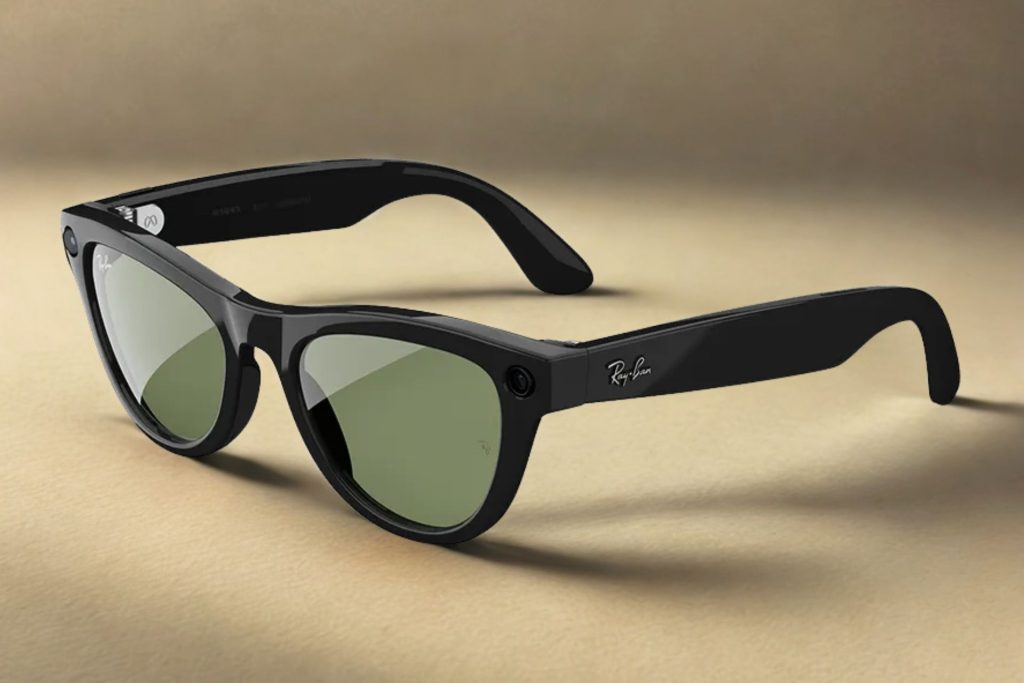
The first smart glasses collaboration that Meta did was with Ray-Ban, who are owned by eyewear manufacturing giant EssilorLuxottica. Now, there are three options available: the Wayfarer, Skylar, and Headliner.
Meta and Ray-Ban really spearheaded the revolution in AI smart glasses. Even though other brands and companies, from Huawei to Hyundai, have their own versions, Ray-Ban x Meta consistently comes out on top.
It’s no surprise why. The combination of classic styles, such as the Wayfarer, and Meta’s newest technology is the perfect balance of fashion and the future.
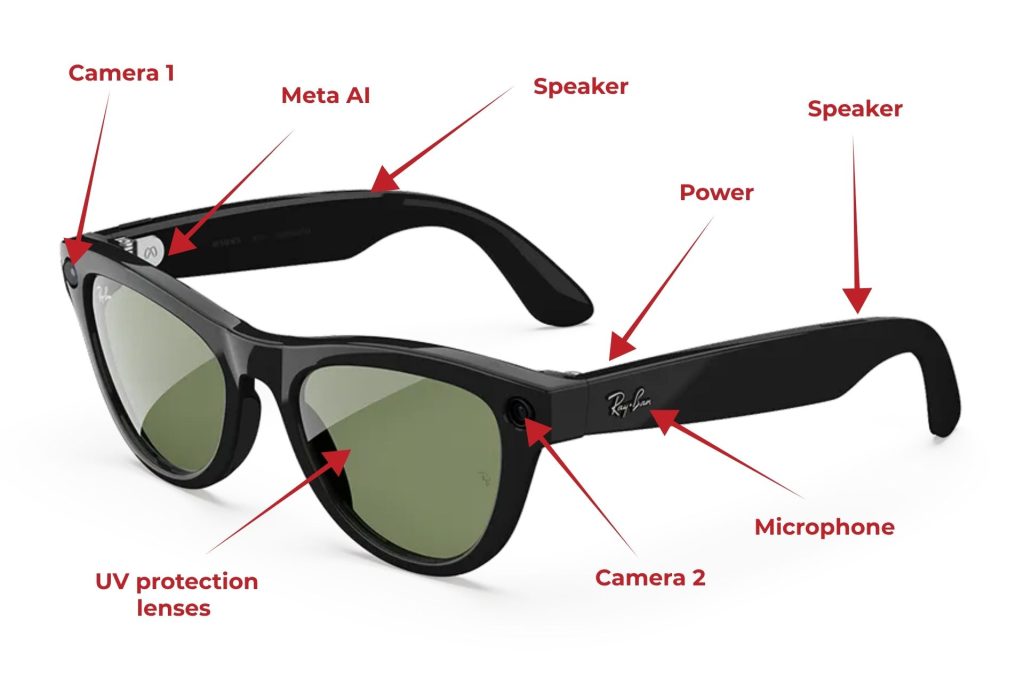
They’re perfect for daily wear with their casual look and convenient functions. They can also play music, answer calls, capture photos and videos, and perform language translation.
One of the most impressive updates is that if you say, “Hey Meta,” you can get answers from Meta AI in seconds. You can also ask it to identify objects and landmarks. Imagine standing in front of a major monument like the Empire State Building and being able to get instant information about it.
It’s a great feature for places that you want to learn more information about. Simply by saying “Hey Meta,” you’ve got the power of AI at your fingertips, or in this case, eyes.
Oakley Meta HSTN Glasses
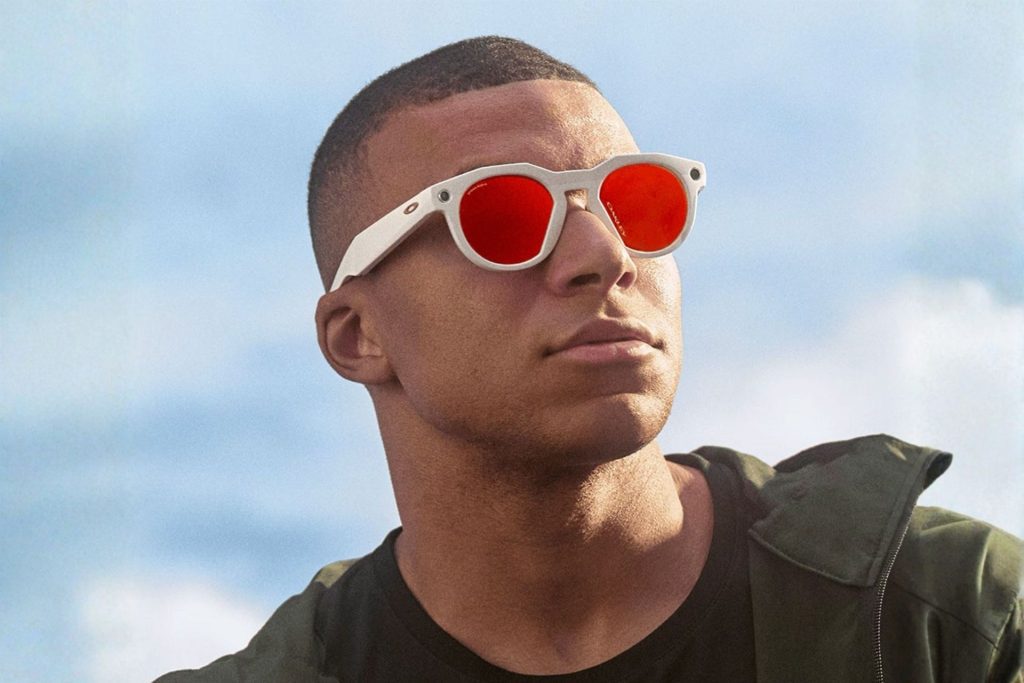
The latest collaboration between EssilorLuxottica and Meta has resulted in the Oakley Meta HSTN Glasses.
They’re a game changer in sports eyewear, making it easier to capture your surroundings with a hands-free camera. They also feature built-in speakers, allowing you to enjoy music while running or cycling.
Like with the Ray-Ban x Meta glasses, if you say, “Hey Meta,” you can get answers from Meta AI in seconds.
Here are some of the specs:
- 12 MP ultrawide camera for photos and videos
- Two hidden open-ear Bluetooth speakers
- 32 GB flash storage, which is about 1,000 photos and 100 short videos
- The battery lasts an impressive eight hours on a single charge.
The collaboration has also led to some of the most stylish smart glasses on the market. They come in several colors with different tinted or clear lenses. They also offer transition lenses so you can go from playing outdoor sports to indoor training.
Oakley Vanguard Smart Glasses

Oakley x Meta has also released new smart glasses designed for sports enthusiasts. And guess what?
They look really cool.
They’re like something out of a Mission Impossible movie, and they’re made to perform like it, too. They feature smooth video capture so you can record while running/jumping, and they have adjustable stabilization for better video quality.
Now you can also seamlessly capture moments from your POV, so when you’re biking up that mountain or running across that canyon, you can record it with hyperlapse or slow motion for some epic videos.
They’re a dream for fitness lovers because these smart glasses can provide real-time insights into your performance when integrated with AI and Garmin (sold separately).
Do you need the internet to use AI smart glasses?
To use AI functions, you need to be connected to the internet. But if you just want to use other smart glasses features like taking photos, then you don’t need an internet connection.
It’s easy to connect your glasses to your home internet. One of the simplest ways is by downloading the companion Meta AI app to your phone. After you’ve downloaded the app, put your glasses into ‘pairing’ mode by holding the blue button on the back of their case.
After about five seconds, the LED case will flash blue. Open the Meta AI app, log in, and select ‘set up a device.’ The app will find your smart glasses and walk you through connecting to Bluetooth and your home internet.
Once your glasses are paired with your phone, you’ll be able to also use your phone’s data to connect to the internet. This is useful when you’re out and about and want to use the internet features on your smart glasses.
Smart Glasses Are Becoming More Trendy

For the new Ray-Ban x Meta collection, they’re pulling out all the stops. I’m talking about getting MAJOR stars to front their campaign.
None other than Teyana Taylor and Doja Cat are the faces of the latest collaboration. Teyana is seen in square blue frames, while Doja sports classic black sunglasses. The latest campaign shows that smart glasses are becoming hotter. They’re now less of a tech gimmick and more of a trendy, must-have accessory for fashion-lovers.
TL;DR
AI is changing our lives with new integrations. Now you can use AI with your smart glasses and see the world through a whole new lens.
- Smart glasses can take photos and videos so you can capture instant moments.
- The basic functions also include listening to music, answering calls, and receiving messages.
- AR smart glasses have a projection screen that’s almost like having a virtual laptop within your glasses. It also features information within your lenses, like the weather and navigation.
- AI smart glasses, such as the Ray-Ban x Meta or the Oakley HSTN glasses collection, feature built-in Meta AI capabilities. So you can ask questions, identify objects, and more.

